
A pairing guide for onboarding juniors
“I’m not a great programmer; I’m just a good programmer with great habits.” - Kent Beck
Everybody works with AI now, and almost always alone. You can ask the agent to push back, and it will, for a while. Insist, and it will come around to your position, contradicting what it told you two messages ago.
Models are trained to please. Your teammates aren’t.
A junior working with AI learns to generate good code fast, and is much slower to question whether that code will still be maintainable in a year. That’s why how you teach them still matters just as much, even with Claude Code or Codex in front of you: the tool changes, the knowledge transfer doesn’t.
I’m helping a junior get into backend development and we’re pairing. But he didn’t know what pairing was, so I’ve written this guide with all my notes: a collection from many articles, books and conversations. Together with the sessions we do, I hope it works for him as a from 0 to hero guide.
A large part of what I’ve written is copied from the Pairing Guidelines written by Rubén Antón, which I liked a lot years ago.
In case it’s useful to you in these new times, here it is.
Why do Pair Programming or Pairing
Pairing is for creating options, reducing risk and reducing rework.
The discussion while you write the code is the important part: reaching consensus forces better decisions, more alignment and fewer errors.
It’s one of the twelve Extreme Programming practices, and in terms of software economics, by Luis Artola, it’s one of the most powerful risk management tools we have: it creates options, reduces complexity and raises the bus factor.
Besides the code, we take home a few things:
- Shared knowledge, both technical and about the business.
- Shared practices and values: design, testing, pragmatism, YAGNI, transparency. You transmit that by pairing, not in a document.
- Shared ownership: less dependency on senior people.
- Immediate onboarding: a new person sees code and contributes from day one.
- A safe place to ask: you learn much faster when you aren’t embarrassed to say you don’t understand something.
The two roles
- Driver: has the keyboard. Works on the step you’re on right now. The syntax, the logic, making this test pass or this step work.
- Navigator: hands off the keyboard. Works one step ahead. Where this is going, what’s going to hurt in ten minutes, what you agreed to do next.
You swap roles throughout the session.
The names come from rally racing. The driver takes the next corner. The navigator (copilot) reads the road ahead and calls it out.
Four things that are easy to get wrong
- Neither role is the senior one. Juniors navigate too.
- Pairing is the review. That’s what saves you the one afterwards: two people agreed on this code while it was being written, not two days later. But you review decisions, not keystrokes. A missing semicolon is for the compiler.
- If you don’t understand it, don’t type it. You aren’t taking dictation. Stop and ask. You’re the one who will have to explain this code tomorrow.
- Navigating isn’t resting. While your pair types, you think about what comes next and say it out loud. If you go quiet for ten minutes, there’s only one person in the session.
The navigator can think because they’re free from the keyboard, and the driver makes progress because they don’t have to think about what comes next. Both roles are tiring, in different ways, and that’s why you swap often.
Before the session it’s good to define this
- Goal: what does “done” mean?
- Mode: learning or delivery (see below)?
- Style: strong-style, ping-pong or free (see below).
- Swap cadence: every green test, or every 25 minutes.
- Calendars: how much time are we really going to pair? On which machine?
- Setup: in the office we use two keyboards, two mice and one computer, so nobody has to move to take over. Remotely, any editor with live collaboration or a screen share with remote control: we use VS Code Live Share.
Whatever role you’re in
- Suggest improvements to the system.
- Clarify the ideas. If you don’t understand what the other person said, say so right away. Many design errors are avoided by asking “what do you mean by that?”.
- Take the initiative when the other is stuck.
As a driver
- Focus only on the step you’re working on. What comes next is the navigator’s job.
- Think out loud: what you’re going to do, what you’re doing, what you just did.
- The handover test: at any moment you should be able to stop typing and your pair should be able to take over.
- Ask for the keyboard when you need it. Not asking is also an error, and an invisible one.
- Don’t drive faster than your pair can follow. Say it when something is making you frustrated.
As a navigator
The driver looks at the how and the what. The navigator looks at the what and the why.
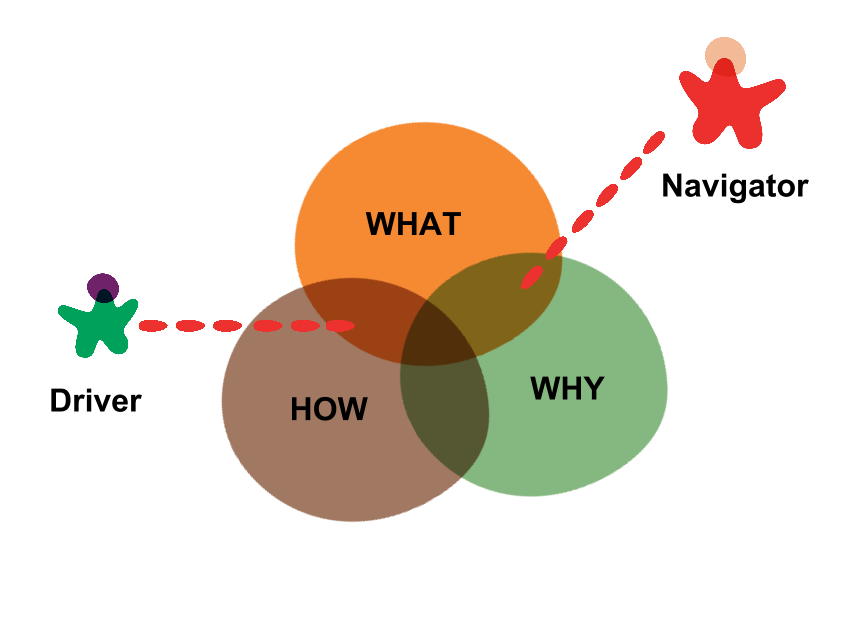
Diagram based on Effective Navigation in Pair Programming (ThoughtWorks).
- You keep the list of what’s left: the goal for the session, the task you’re on, and the concrete step the driver is taking. For example: “orders can be cancelled” -> “block cancelling the ones already shipped” -> “make this test pass”. When the driver closes a step, you already know which one comes next.
- Write it down, don’t blurt it out. Note ideas and obstacles, and bring them up when the current goal is closed. If the driver is typing, they can’t listen to you.
- Don’t argue about variable names or syntax while they type. That’s the driver’s job, and they will ask if they have doubts. If something still bothers you, write it down.
- The 5 second rule: before you point at an error, wait. They may have seen it already.
- Say the least that lets them continue. If “let’s extract the discount calculation” already gets them typing, don’t tell them where it is or how to find it. If you start with “look at lines 20-26 and press Cmd+Alt+M”, you’re dictating, not navigating.
- Talk in we, not in I and you.
- Keep the course: baby steps, YAGNI, KISS. The TDD cycle is your responsibility. Remind them: “let’s start with a test”.
- Many low-level interruptions mean it’s time to swap roles.
- Get paper and a pencil. Pseudocode, boxes and arrows. When we pair remotely we use Miro or Excalidraw.
Styles
- Ping-pong: you write a failing test and hand over the keyboard. Your pair makes it pass, writes the next failing test and hands it back. The role swap is built in, which is why it’s the best default with TDD.
- Strong-style: the idea is that “for an idea to go from your head to the computer it must go through someone else’s hands”. The person with the idea navigates; the other one drives. It needs a driver who is comfortable not understanding everything yet. Very good for knowledge transfer, but it can overwhelm the driver. Agree on it before you start.
- Free: no swapping rules, you hand over the keyboard when you need to. It works when you both have practice; with a senior and a junior it almost always ends up with the senior typing and the junior watching.
Modes
- Learning mode: we trade productivity for knowledge transfer. Driver = the person receiving the knowledge.
- Delivery mode: we trade knowledge transfer for productivity. Driver = the person with the most practice.
Agree on it out loud. Otherwise one of you will be teaching while the other is trying to deliver.
When not to pair
- Trivial or mechanical task: either of you could do it alone, and there’s nothing to learn.
- Too many unknowns for both of you: spike separately, agree on the questions first, and share the findings.
- Somebody needs time alone. You have to make room for that.
When you split, keep syncing up (over Slack, for example). You’re still working on the same task together.
Time
- Pomodoro 25/5, swap roles during the break. Long break every four pomodoros.
- 6 hours of pairing per day maximum. Eight isn’t sustainable. Remotely it’s even less: sharing a screen and a call all day is more tiring than sitting next to someone, so plan for two to four.
- Rotate pairs to spread knowledge, but not just for the sake of it. Every rotation costs context, and lost context becomes rework. So rotate one person at a time: the one who stays passes on what isn’t written down anywhere.
- At the end of the day, a two minute mini retro. Did we swap roles enough? What would we change tomorrow? Make it a routine before something goes wrong.
Common errors
- Starting without a clear goal.
- Monopolizing the keyboard, or never asking for it.
- Not letting your pair finish the sentence.
- Being comfortable only writing, or only reading.
- Never swapping, never resting.
- Changing mode without saying it.
- A quiet navigator has been lost for a while. Ask them what they would do now, or switch to strong-style.
- Answering or checking Slack in the middle of the pairing session.
Conclusions
None of this is a new technique: it’s the same thing as always, two people agreeing on the code while they write it. What has changed is that it’s easier than ever to spend the whole day writing code with an agent that never really pushes back.
If you work with a junior, that pushback is exactly what you have to teach them to give.
References
- Pairing Guidelines (Rubén Antón. The base for most of this guide)
- Software economics (Luis Artola. The cost/value/risk/debt framework, in Spanish)
- The Costs and Benefits of Pair Programming (Cockburn & Williams. Costs ~15% more effort, pays it back in fewer defects)
- Pair Programming vs. Solo Programming: What Do We Know After 15 Years of Research? (meta-analysis)
- On Pair Programming (Böckeler and Siessegger. The most complete treatment)
- Effective Navigation in Pair Programming (ThoughtWorks. Goal stack, communicating the intent)
- Strong-Style Pairing (Falco)
- Rotate pairs experiment
- Kent Beck, XP Explained
- Pair Programming: mi guía práctica (Juan David Vega, in Spanish)
- Productive pair programming (Carlos Blé)
If you want to comment on something, you can write to me directly on LinkedIn, X, Bluesky or GitHub.